Epfo Login is the online facility that allows EPF members to access their Provident Fund account through the official EPFO Member e-Sewa Portal.
Using their UAN (Universal Account Number) and password, members can access various services without visiting an EPFO office. Through the EPFO Member Login, users can check available PF details, view their EPF passbook, submit eligible online claims, track claim status, manage e-KYC, complete e-nomination, and access other available services.
The UAN Login facility also makes it easier to manage PF-related information linked with different employment periods.
These services are provided by the Employees’ Provident Fund Organisation (EPFO), a statutory organisation under the Government of India responsible for administering EPF and related schemes.
In this guide, you will learn about EPFO Login, registration, EPFO Member Login, UAN Login, and the important services available after signing in.
What Is EPFO Login?
Epfo Login is an online facility that allows EPF members to access their Provident Fund account through the EPFO Member Portal. Members can sign in using their UAN (Universal Account Number) and password to access available PF-related services from one place.
After logging in, eligible members can view their PF account details, access or download the EPF passbook, check contribution information, manage eligible KYC and profile details, submit online claims, track claim status, and use other EPFO services. The exact services available may depend on the member’s account status and EPFO’s current online facilities.
Details Required for EPFO Member Login
Before starting the EPFO Member Login, keep the following information ready. Entering the correct details helps you sign in without unnecessary errors.
| Login Detail | What You Need |
| UAN | Your 12-digit Universal Account Number (UAN) linked to your EPF account. |
| Password | The password created for your UAN account during activation or later updated through the portal. |
| Captcha | The security code displayed on the EPFO login page. Enter it exactly as shown. |
| Registered Mobile Number | Your mobile number should be linked with your UAN for OTP-based verification and other services. |
How to Register on the EPFO Portal
EPF members can activate their UAN and access online PF services through the EPFO Member Portal. To complete the registration or UAN activation process, follow these steps:
- Visit the official EPFO Member e-Sewa Portal and select “Activate UAN.”
- Enter the required details, such as your UAN, Aadhaar number, date of birth, name, mobile number, and captcha.
- Verify that the information entered matches your EPFO records, then submit the details.
- An OTP will be sent to your registered mobile number for verification.
- Enter the OTP and complete the verification process.
- After successful activation, you can use your UAN credentials to access the EPFO Member Login and available online PF services.
Once your UAN is activated, keep your login credentials secure and use the official EPFO portal whenever you need to access your PF account.
How to Login to EPFO Member Portal
The EPFO Member Portal provides EPF members with online access to important Provident Fund services. Employees can use their activated UAN and password to sign in and manage eligible PF-related services from the EPFO Member e-Sewa Portal.
For better accuracy, always use the official EPFO website when entering your UAN, password, or OTP. The exact options displayed on the portal may change when EPFO updates its online services.
EPFO Member Login for Employees
If you already have an activated UAN, you can access your EPF account by following these steps:
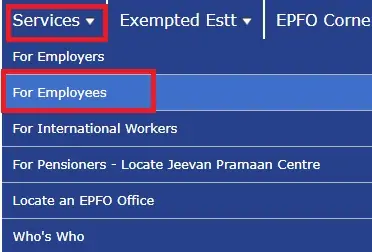
- Visit the official EPFO website and open the Services section.
- Select For Employees.
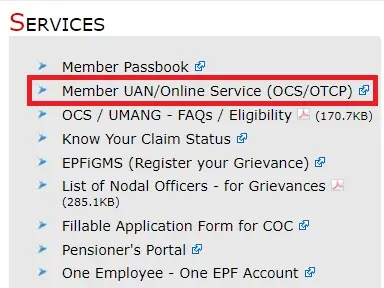
- Click on Member UAN/Online Service to open the EPFO Member e-Sewa Portal.
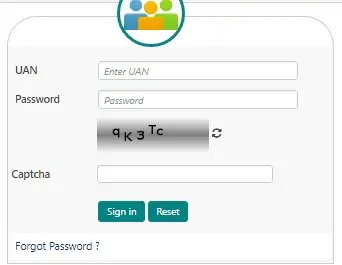
- Enter your UAN, password, and the captcha displayed on the screen.
- Click Sign In to continue.
- If EPFO asks for additional verification, complete the required OTP or authentication step using your registered mobile number.
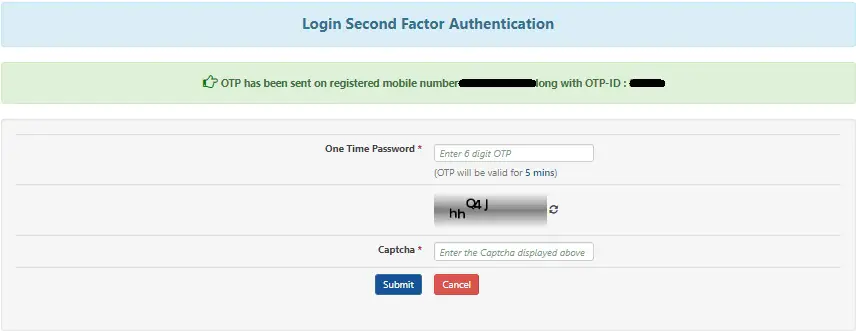
- After successful verification, you can access your EPFO member dashboard.
Once logged in, the services available to you may include PF account information, passbook access, KYC-related services, claims, transfers, e-nomination, and other member facilities.
What If Your UAN Is Not Activated?
An activated UAN is generally required to use the EPFO Member Portal. If your UAN has not been activated, select the Activate UAN option available on the member portal and complete the verification process.
After activation, you can use your UAN credentials for future EPFO Member Login.
EPFO Employer Login
EPFO employer login/EPF employer sign-in process includes these steps:
The general process is:
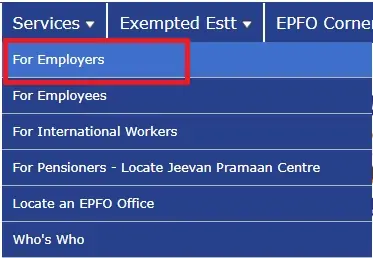
- Go to the official EPFO website and select ‘For Employers’ under the ‘Services’ section.
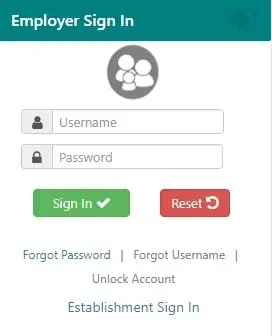
- On the new page, click ‘Online ECR/Challan Submission/OTCP’ under ‘Services’. You can also directly visit the EPF Unified Portal for Employers. Make sure you sign in through ‘Employer’s Sign In’ and not ‘Establishment Sign In’, or change the option shown below the sign-in tab.
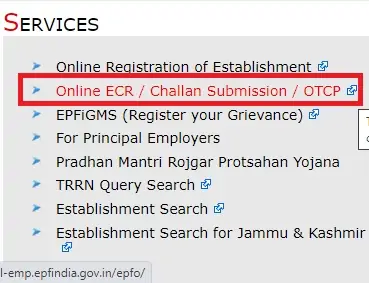
- An employer can sign in with the username after successfully registering the establishment. Under the ‘Services’ section, select ‘Online Registration of Establishment’. Read the instructions and continue.
Employers can use the available portal facilities for services such as establishment-related work, electronic challans, contribution-related processes, and other EPFO compliance requirements.
EPFO Member Login via UMANG App
EPFO member services can also be accessed through the UMANG (Unified Mobile Application for New-age Governance) app. It is a government platform that provides access to various services, including selected EPFO and PF-related facilities. To use EPFO services through UMANG, follow the steps below:
- Download and install the UMANG App from the official Play Store or App Store.
- Open the app and register or log in using your mobile number.
- Complete the required verification and sign in using your MPIN or available epfo login method.
- Go to the “All Services” section and search for EPFO.
- Select “EPFO” from the available services.
- Choose “Employee Centric Services.”
- Enter your UAN and complete OTP verification if required.
- After successful verification, you can access the available EPF details and member services through the UMANG App.
Services Available After EPF Login
After completing the EPF Login, members can access various online services through the EPFO Member Portal. The services available may depend on the member’s account status, KYC information, and current EPFO facilities.
- Check PF Balance: View available PF account and contribution details.
- View EPF Passbook: Access or download your EPF passbook to review contribution records.
- Download UAN Card: View and download the UAN card through the available member services.
- Submit Online Claims: Apply for eligible PF withdrawal, advance, or transfer services online.
- Track Claim Status: Check the current status of an EPFO claim submitted online.
- Manage KYC: Access eligible KYC services for Aadhaar, PAN, and bank account details.
- Transfer PF Account: Apply for an eligible PF transfer when changing jobs.
- Update Profile: Manage eligible personal and profile information available through the portal.
- E-Nomination: Complete or manage your e-nomination details online.
- Raise Grievances: Submit and track EPFO-related complaints through the applicable grievance facility.
These online services make it easier for EPF members to manage their PF account and complete routine tasks without visiting an EPFO office.
Eligibility for EPFO Member Login
To use the EPFO Login facility, you should generally meet these requirements:
| Requirement | Details |
| EPF Membership | You should have an active EPF account or membership. |
| UAN | A valid UAN should be allotted to you by EPFO. |
| UAN Activation | Your UAN should be activated before using the member login facility. |
| Registered Mobile | A mobile number should be linked with your UAN for applicable verification services. |
| Correct Details | Your basic personal information should match the records maintained by EPFO. |
If you have forgotten your password or your registered mobile number is no longer available, use the applicable recovery or correction options provided through the official EPFO portal.
How Can I Get My UAN?
Your UAN (Universal Account Number) is a unique 12-digit number used to manage your EPF account and access EPFO member services. In most cases, your employer provides the UAN details when you become an EPF member. The same UAN generally remains with you even when you change jobs, while your employment-related PF member accounts may change.
If you do not remember your UAN, you can use the Know Your UAN facility on the EPFO Member Portal.
Steps to Find Your UAN Online
- Visit the official EPFO Member e-Sewa Portal.
- Select the “Know Your UAN” option.
- Enter your registered mobile number and the captcha displayed on the screen.
- Click “Request OTP” and complete the mobile verification.
- Enter the OTP when prompted.
- Provide the requested details, such as your name, date of birth, Aadhaar, PAN, or member ID, as applicable.
- Complete the verification process and select the option to view your UAN.
The information you enter should match your EPFO records. If there is a mismatch, you may not be able to retrieve the UAN through the online process.
How to Reset EPFO Login Password?
If you have forgotten your EPFO UAN Login password, you can reset it through the Forgot Password option available on the Member e-Sewa Portal.
Steps to Reset Your EPFO Password
- Open the official EPFO Member e-Sewa Portal.
- Click “Forgot Password” on the login page.
- Enter your UAN and the captcha code.
- Submit the details to continue.
- Follow the verification instructions displayed by EPFO.
- Verify your identity using the required personal or account information.
- An OTP may be sent to your registered mobile number for verification.
- Enter the OTP received on your mobile.
- After successful verification, create a new password.
- Confirm the new password and submit the request.
Once the password has been successfully changed, you can use your UAN and new password for EPFO Member Login.
Important: EPFO may update its verification steps from time to time. Always follow the instructions currently displayed on the official portal and never share your OTP or password with anyone.
Digital Services/SMS/Missed Call
You can use digital services through the UMANG App and official EPFO websites. You can send an EPF balance request to 7738299899 to get PF-related information through SMS.
It is a simple and quick way to get information without visiting the EPFO office. Registered UAN members can also give a missed call on 9966044425 from their registered mobile number to get details of their latest PF contribution and PF balance.
EPFO Helpdesk
Address: East Kidwai Nagar, New Delhi – 110023
Helpline: 14470 (7 AM–9 PM)
Toll-Free: 1800-118-005
Enquiries: 011-20815653
Employee Email: employeefeedback@epfindia.gov.in
Employer Email: employerfeedback@epfindia.gov.in
Grievances: EPFiGMS
EPFO provides a dedicated helpdesk for employees and employers to get assistance with UAN and other EPF-related queries. You can contact the EPFO helpdesk by phone or email to get support for your concerns.
For assistance, you can contact EPFO at 1800-118-005 or 14470 (toll-free).
FAQs – About Epfo Login
-
What is the EPFO Member Login?
EPFO Member Login allows employees to access their PF account and available EPFO services online using their UAN and password.
-
How can I access the EPFO Member Login Portal?
Visit the official EPFO Member e-Sewa Portal and sign in using your UAN, password, and captcha.
-
What details are required for EPFO Member Portal Login?
You generally need your UAN, password, and the captcha shown on the login page.
-
Can I check my PF balance through EPF Member Login?
Yes, you can access available PF account and contribution information after logging in.
-
What should I do if I forget my EPFO Member Login password?
Use the Forgot Password option on the EPFO Member Portal to reset your password.
-
Why am I unable to access the EPFO Member Login Portal?
Check your UAN, password, captcha, internet connection, and account status. Temporary portal issues can also affect Epfo login.
-
Is EPFO Member Portal Login available on mobile?
Yes, you can access EPFO’s mobile-friendly services, and selected EPFO facilities are also available through the UMANG App.
-
Do I need to activate UAN for EPFO Member Login?
Yes, an activated UAN is generally required to access the EPFO Member Portal.
-
Can I update my details using EPF Member Login?
Yes, eligible members can access available profile and KYC-related update services after login.
-
Is the EPFO Login Portal safe to use?
Yes, when you use the official EPFO portal. Never share your password, OTP, or other confidential information with anyone.